







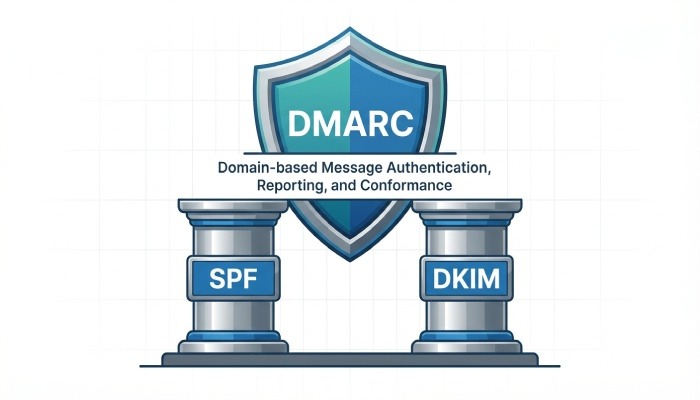
DMARC (Domain-based Message Authentication, Reporting, and Conformance) is an essential email authentication protocol that helps protect your domain from spoofing, phishing, and unauthorized use. It builds on SPF and DKIM to verify that emails sent from your domain are legitimate. With a properly configured DMARC record, you can instruct receiving mail servers on how to handle suspicious messages. This not only strengthens your email security but also improves trust and deliverability.
What is a DMARC record? Purpose, how DMARC works with SPF and DKIM, domain alignment, and benefits
The big picture: why DMARC matters for email authentication
A DMARC record is a DNS TXT record that instructs mail servers how to handle emails that fail authentication checks. It works by combining SPF and DKIM results with the visible “From” domain, ensuring that only legitimate emails sent from your domain are accepted. This alignment verifies that messages truly come from your domain, helps prevent spoofing and unauthorized use, and improves overall email security and trust.
By building on SPF and DKIM, DMARC strengthens email security and helps prevent phishing and spoofing attacks. It improves email deliverability by ensuring only authenticated messages are trusted by receiving servers. DMARC also provides detailed reports on email activity and authentication failures, offering better visibility into your domain’s usage. This helps domain owners enforce stronger policies and protect their brand reputation.
Inside the DMARC DNS TXT: required and optional tags (v, p, rua, ruf, fo, aspf, adkim, pct, sp), policy modes, and alignment
Anatomy of the DMARC DNS TXT record
A DMARC record is published as a DNS TXT record at a special host: _dmarc.example.com (replace example.com with your domain). It contains tag-value pairs—compact, machine-readable commands that receivers parse to apply your DMARC policy and to deliver reports. At minimum, it includes version and policy tags; most domains also include reporting.
Required tags and policy modes
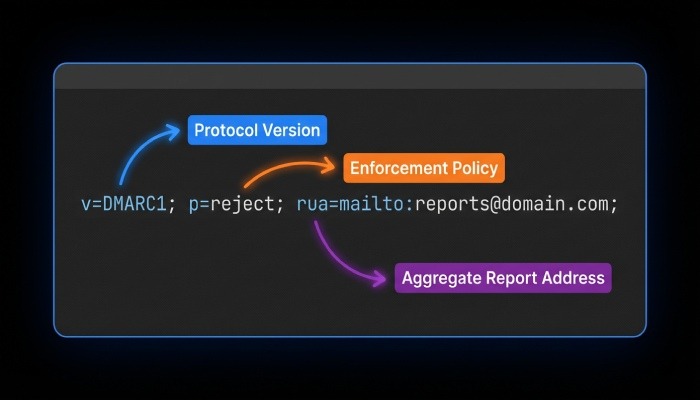
- v=DMARC1 declares the protocol version.
- p defines the DMARC policy mode applied to your organizational domain. Common values are:
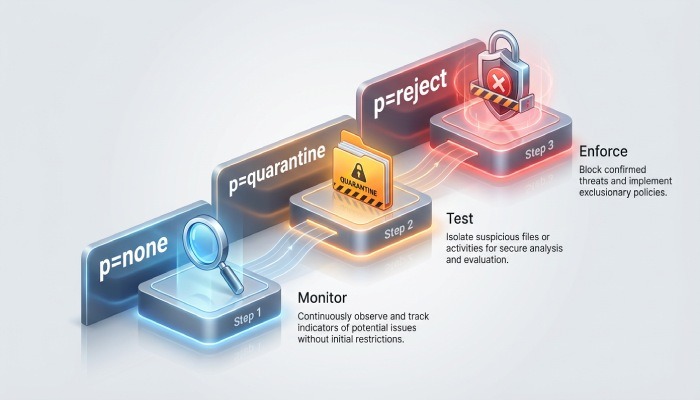
- p=none (a monitoring stance known as the none policy; no enforcement)
- p=quarantine (suspicious mail should be quarantined, often to the spam folder)
- p=reject (unauthenticated mail should be rejected outright)
These modes—none policy, quarantine, and reject—let you phase in policy enforcement as you gain confidence. A DMARC policy at p=none collects visibility via reports without impacting mail flow; p=quarantine begins to protect users; p=reject provides the strongest defense.
Optional tags you should know
- rua specifies the aggregate reports reporting address (e.g., rua=mailto:dmarc@yourdomain.tld). Aggregate reports summarize authentication outcomes by source and volume.
- ruf provides a forensic reporting address (ruf=mailto:dmarc-forensics@yourdomain.tld) to receive message-specific failure samples, known as forensic reports.
- fo tag controls failure reporting options for forensic reports (e.g., fo=1).
- aspf sets SPF alignment mode (r for relaxed, s for strict).
- adkim sets DKIM alignment mode (r or s).
- pct tag applies policy to only a percentage of mail (e.g., pct=25 during testing).
- sp tag sets the subdomain policy. If present, it overrides p for subdomains (e.g., sp=quarantine).
- rf tag selects the report format for forensic reports (commonly rf=afrf).
- ri tag sets the reporting interval in seconds for aggregate reports (often ri=86400).
Tag-value pairs are precise by design
DMARC tags are deterministic, machine-readable commands. Receivers expect accurate syntax, semicolons separating tag-value pairs, and no stray whitespace. Precision ensures your DMARC policy is interpreted consistently across every email server.
Setup walkthrough: preparing SPF/DKIM, building the DMARC record, publishing at _dmarc.yourdomain, and sample configurations
Step-by-step from groundwork to publication
Establishing a resilient DMARC policy begins with good foundations in SPF and DKIM.
Prepare SPF and DKIM
- Publish a correct SPF record that enumerates all legitimate sending sources, including any third-party service you use (marketing platforms, ticketing systems, etc.). Keep the Sender Policy Framework within the 10-DNS-lookup limit to prevent DNS exhaustion.
- Configure DKIM for each sending platform. Publish a DKIM record (public key) per selector in DNS, and ensure each platform signs the From domain you intend to protect. Consistent DKIM signing is vital for alignment.
Build the DMARC record
- Choose an initial none policy to gather data: set p=none and specify a reliable reporting address for rua (and optionally ruf).
- Decide alignment mode: start with relaxed (aspf=r; adkim=r) and tighten to strict (aspf=s; adkim=s) after validating senders.
- Consider a subdomain policy: if subdomains send mail, specify sp tag (e.g., sp=quarantine) to apply distinct enforcement.
- Add pct tag to throttle rollout as needed, and set ri for reporting cadence.
Publish at the right location
- Create a DNS TXT record at _dmarc.yourdomain (e.g., _dmarc.example.com).
- If your DNS is hosted on Cloudflare, route53, or another provider, use their UI to add the DNS TXT record exactly. Validate with MxToolbox to confirm propagation and syntax.
Sample configurations you can copy
- Monitor only (none policy): v=DMARC1; p=none; rua=mailto:dmarc@example.com; ruf=mailto:dmarc-forensics@example.com; aspf=r; adkim=r; ri=86400; rf=afrf; fo=1
- Begin enforcement (p=quarantine) with partial rollout: v=DMARC1; p=quarantine; pct=50; sp=quarantine; rua=mailto:dmarc@example.com; aspf=r; adkim=r; fo=1
- Full enforcement (p=reject) with strict alignment: v=DMARC1; p=reject; sp=reject; rua=mailto:dmarc@example.com; ruf=mailto:dmarc-forensics@example.com; aspf=s; adkim=s; ri=86400; rf=afrf; fo=1
These examples demonstrate how a DMARC record tool uses tag-value pairs to define a DMARC policy, reporting, and alignment in one concise DNS TXT record.
Monitoring and optimization: interpreting aggregate (RUA) and forensic (RUF) reports, tooling, and phased rollout from none to reject
From visibility to policy enforcement
Aggregate reports (RUA) provide daily XML summaries of who is sending as your domain, which IPs passed or failed SPF and DKIM, and how receivers applied your DMARC policy. Use them to map all legitimate sources and to spot unauthorized traffic indicative of spoofing or a phishing attack. Forensic reports (RUF) are message-level samples when a message fails authentication; enable forensic reporting judiciously due to potential sensitivity and volume.
Tooling accelerates insight. Feed rua and ruf data into an analytics platform or a trusted third-party service; many teams start with lookups in MxToolbox and evolve to dedicated dashboards. Track trends at major receivers like Gmail and Yahoo! Mail to ensure changes improve deliverability and spam prevention.
Adopt a phased rollout. Start at p=none to collect aggregate reports without risking mail flow. Once you’ve aligned each SPF record and DKIM record across senders, move to p=quarantine and increase pct tag gradually (25, 50, 75, then 100). Tune alignment mode via aspf/adkim, adjust ri tag for report frequency, and finally progress to p=reject when confident. This measured path from none policy to quarantine to reject turns visibility into effective defense while safeguarding business email.
Troubleshooting and best practices: third-party senders, subdomains and sp tag, avoiding multiple records, common errors, and deliverability tips
Practical guidance to keep your DMARC record effective
Third-party senders
- Ensure every third-party service signs with DKIM using your domain and is included in your SPF record. If they cannot align SPF, rely on DKIM alignment instead.
Subdomains and subdomain policy
- Use the sp tag to set a subdomain policy distinct from your apex domain (e.g., p=reject with sp=quarantine while you validate subdomain flows). This avoids surprises when a subdomain’s email server is not yet configured.
Single authoritative record
- Publish exactly one DMARC record per domain at _dmarc.example.com. Multiple DMARC records cause receivers to ignore the policy, undermining email authentication.
Common errors to avoid
- Syntax mistakes in tag-value pairs, missing v=DMARC1, or malformed reporting addresses derail reporting.
- Misaligned identities: a platform signs DKIM for a different domain, so alignment fails even if DKIM verifies.
- Over-reliance on SPF: forwarding can break SPF; ensure DKIM signatures survive transit.
- Setting p=reject before inventorying all senders can lead to wanted mail in quarantine or outright reject actions when a message fails authentication.
Deliverability and receiver expectations
- Major receivers like Gmail and Yahoo! Mail reward strong Domain-based Message Authentication Reporting and Conformance with more consistent inbox placement. They honor your DMARC policy signals—none policy for monitoring, quarantine for suspicious traffic, and reject for untrusted mail—especially when SPF record and DKIM record alignment is solid. This strengthens email security against malware, phishing, and spoofing and supports long-term spam prevention.
When a message fails authentication, examine aggregate reports for source IPs and identifiers, validate DKIM keys in DNS, and confirm the sending IPs are authorized in the SPF record. Collaborate with your domain administrator or email administrator to correct DNS, rotate keys, or adjust alignment mode (aspf/adkim). With accurate DNS TXT record entries and continuous review of aggregate reports and forensic reports, your DMARC policy will evolve from none policy to effective quarantine and, ultimately, to confident reject enforcement under the principles of Domain-based Message Authentication Reporting and Conformance.